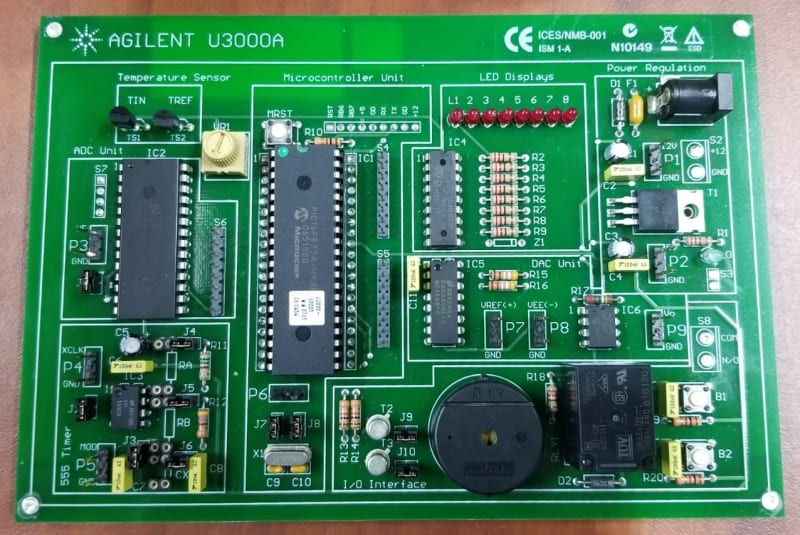
Agilent U3000A
Key Features
• Training board with up to eight
selectable modes of operation
• Works with four basic test
instruments and Agilent VEE
Pro 8.0
• Comes with teaching materials,
lab exercises and assessments
• Complete solution for
instrumentation teaching
Enables hands-on experience for
students
Solution for Basic Electronic
Teaching Lab
The U3000Aelectronic
instrumentationtraining kit provides
a learningand teaching solution for
electronictest instruments. With its
multiplemodes of operation, it offers
aninteractive learning experience to
students.Step-by-step lab
exercisesenable students and
engineers toexplore the powerful
features ofAgilent’s instruments and
graphicaltest and measurement
software.Comprehensive teaching
materials ontest instruments provide
a linkbetween your teaching and
learningefforts and the application of
electronictest instruments in realworld
scenarios.The Agilent U3000A
training kitworks with four basic
instrumentsand one graphical test
software:power supply, digital
multimeter,digital oscilloscope,
functiongenerator, and Agilent VEE
Pro 8.0. Thismakes the training kit an
essentialtool for your teaching lab.
Training Kit with Power Supply
Power supplyis one of the most
commonly usedtools in design
validationand manufacturing tests.
The teachingand lab materials help
students tobetter understand the key
advantages ofvarious power supply
designs andways to optimize the
output.
Training Kit with Digital
Multimeter
Agilentoffers a wide range of digital
multimeters.The Agilent U3000A
training kitenhances your students’
knowledge ofthe operation of DMMs.
In addition,the students learn
techniquesthat enable them to avoid
measurementerrors and to carry out
fasttroubleshooting processes.
Training Kit with Oscilloscope
For those whowish to explore the
powerfulfeatures of Agilent’s
oscilloscope,the simulated waveforms
and labexercises of the U3000A will
walk youthrough each function in
great detail.Your students can also
learn how toselect an oscilloscope
that meetstheir needs.
Training Kit with Function
Generator
Functiongenerator is an essential tool
in designvalidation. In the lab
exercises,your students will learn
ways toproduce and send various
signals tothe training board using
the Agilent’sfunction generator. With
the providedtraining materials, your
students areable to learn operating
principlesand applications of various
types ofwaveform generators.
Training Kit with Agilent VEE
Pro 8.0 and IO Connectivity
The AgilentVEE Pro 8.0 graphical
languageenvironment software keeps
programmingsimple and less complex
developmentscreen. This enables
users tostart making measurements
easily. Withthe bundled teaching
materials,students are able to learn
the graphicalprogramming basics, to
control theinstruments from their PC,
to automaterepetitive and iterative
measurementtasks, and to send a
measurementdata to a log fi le. In
addition, the82357B USB/GPIB
interfaceallows a direct connection
from the USBport to GPIB
instruments.The 10833A GPIB-to-
GPIB cableallows fl exibility and
scalabilitywithout compromising the
performance.
U3000A + Power Supply
The AgilentE3631A triple output
power supplyis the most
recommendedmodel to be operated
with U3000Atraining board. For
operationmodes 3 through 8, two
regulatedvoltage supplies are required
for theDigital-to-Analog converter
(ADC) asnegative supply (VEE = –15
V) and outputvoltage reference (VREF
= +10 V). Themicrocontroller
processes theinput from the ADC
in order togenerate various types of
signals forthe lab exercises.
U3000A + Digital Multimeter
Therecommended 34405A digital
multimeter isused to teach you how
to performvoltage, current, resistance,
capacitance,frequency, and diode
measurementsin practice. Use the
U3000Atraining board with the digital
multimeter tounderstand
measurementconnections and
methods.
U3000A + Digital Oscilloscope
The AgilentDSO3000 Series economy
oscilloscoperepresents the best
choice whenused in combination
with theU3000A training board. Going
through theprovided lab exercises,
you willlearn to analyze various types
of signals orwaveforms generated by
the U3000Atraining board, including
countersignals, square waves from a
555 timer,irregular pulse waves,
triangularwaves, and sinusoidal
waves.
The automaticmeasurement functions
of theoscilloscopes allow you to make
and displayany or all different
measurementssimultaneously. In
addition, youwill also learn to display
a waveform ina frequency domain
using theFast Fourier Transform (FFT)
function andto fi lter a mixed
sinusoidalsignal using the digital
fi lteringtechnique.
U3000A + Function Generator
The U3000Atraining board consists of
an on-boardtimer and a crystal
oscillator.The provided lab exercises
guide youthrough the necessary steps
to generateinput signals using the
Agilent33220A function
generator, toreplace the on-board
timer andmicrocontroller’s clock. You
are enabledto control the
microcontroller’sclock using the
33220Afunction generator and to
observe theresulting output from the
U3000Atraining board.
U3000A + Agilent VEE Pro 8.0
+ IO Connectivity
Software Solution: Agilent VEE Pro
8.0
The AgilentVisual Engineering
Environment(VEE) Pro 8.0 software
provides youa quick and easy path to
measurementand analysis. By
keepingprogramming simple and
utilizing thehigh-level task oriented
“fl owchart”design, Agilent VEE
makeslearning so straightforward that
you can getstarted on your
measurementtasks instantly.
hing
material coverage
• Powersupply design overview
• Advantagesand disadvantages of
linear powersupplies and
switchingpower supplies
• Operatingprinciple of DC-DC
converters
• Methods ofpower supply
protection
• Basicprinciple of linear power
supply —operating modes,
unwantedsignals, unregulated
states,remote programming
• Practicaltips to optimize power
supplycapability for different
applications
Digital multimeter teaching
material coverage
• Basic functionsof digital
multimeter
• Operatingprinciples of the basic
functions
• Measurementerrors overview
• Advancedfunctions that simplify
commonmeasurement tasks
• Circuitfault fi nding with digital
multimeter
Digital oscilloscope teaching
material coverage
• Basicfunctions of digital
oscilloscope
• Types ofoscilloscopes
• Digitaloscilloscope parameters
overview
• Performingmeasurements with
digitaloscilloscopes
• Tips forselecting your ideal
digitaloscilloscope
Function generator teaching
material coverage
• Operatingprinciples of the
functiongenerator
• Comparisonof function generator
and arbitrarywaveform generator
• Functiongenerator design and
operatingprinciples
•Applications of the function
generator
Agilent VEE Pro 8.0 teaching
material coverage
Graphicalprogramming language
for test andmeasurement
applications
Basic VEEobjects that control
data fl ow,display or process data
Controlinstruments from a PC
Automaterepetitive and iterative
measurementtests
Sendmeasurement data to a log
Lab Exercises
Power supply lab exercises
• Ratedvoltage and current
settingscheck
• Voltage andcurrent
measurementin Constant
Voltage (CV)and Constant
Current (CC)modes
• Waveformanalysis with power
supply totraining board
Digital multimeter lab
exercises
• Voltage andcurrent
measurements
• Resistance,capacitance,
frequency,and diode
measurements
Digital oscilloscope lab
exercises
• Waveformmeasurements
• Digitalnoise fi ltering
Function generator lab
exercises
• Modulatedwaveform generation
• Waveformgeneration to training
board
• Frequencysweep generation
Automated lab exercises using
Agilent VEE Pro 8.0
Utilized aGUI developed in
Agilent VEEPro to control the
instruments(power supply,
digitalmultimeter, digital
oscilloscope,and function
generator)
To see whatare the SCPI
command usedin controlling the
instruments
Student lab exercises using
Agilent VEE Pro 8.0
Learn togenerate virtual
waveform andview it using the
Waveform(Time) and Spectrum
Magnitudeobjects
Learn toupload an arbitrary
waveform to afunction generator

.jpg)